Last week, I burned through an entire day’s worth of Claude Pro credits in about forty minutes. I’d set up a Cycle to refactor a mid-sized codebase, walked away to make coffee, and returned to find Claude stuck in a loop — rewriting the same file over and over, each iteration slightly different but never “done.” That expensive mistake is exactly why I’m writing about claude cycles mistakes beginners make, and how you can avoid every single one of them. I made mistake #3 on this list for six months before someone on a Hacker News thread pointed it out.
If you’ve seen the buzz around Cycles — Anthropic’s agentic loop feature for Claude that lets it autonomously plan, execute, and iterate on multi-step tasks — you already know the potential is enormous. The feature racked up 705 points on Hacker News when it launched, and for good reason. But the gap between “this is incredible” and “why did I just waste $20 in credits” is shockingly narrow. If you’re exploring AI tools more broadly, our guide to the best AI tools in 2026 puts Cycles in context with other options worth knowing about.
Below are the seven most common mistakes — and exactly how to fix each one.
First, a Quick Primer: What Are Claude Cycles?
Think of Cycles like giving Claude a to-do list instead of a single question. In a normal chat, you ask one thing, get one answer. With Cycles, Claude enters an agentic loop — it plans a sequence of steps, executes them one at a time, checks its own work, and moves to the next step. It can read files, write code, run commands, and iterate until the task is complete.
It’s like hiring a contractor versus asking a friend for one quick favor. The contractor shows up, surveys the job, works through it step by step, and (ideally) tells you when it’s finished. The problem? A contractor with no clear scope, no deadline, and no budget limit will renovate your entire house when you only wanted a new shelf.
Why this matters: Every step in a Cycle consumes tokens from your context window and credits from your plan. Understanding how Cycles work mechanically is the foundation for avoiding every mistake on this list.
If you understand that Cycles are multi-step autonomous loops with real cost per step, you’re ready for the next part.
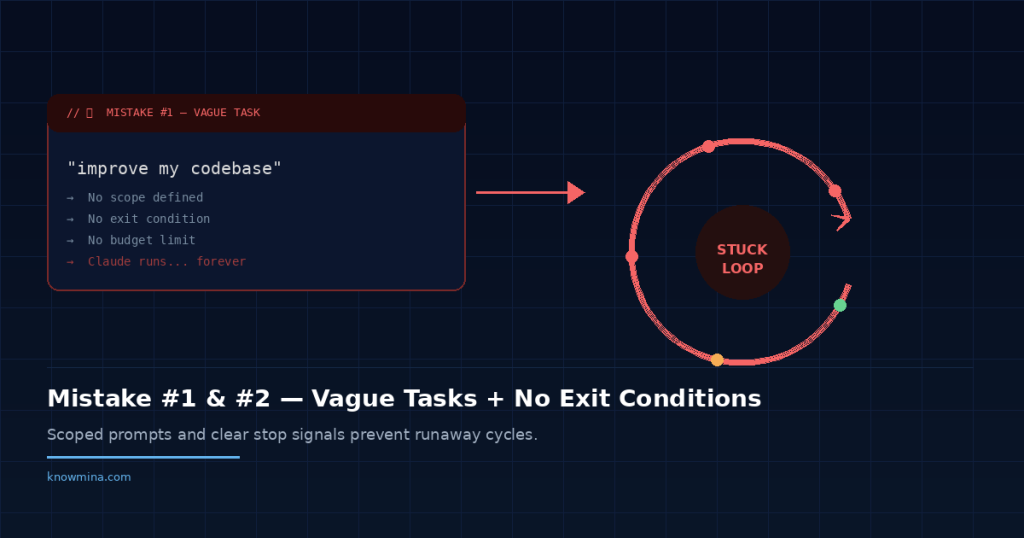
Mistake #1: Giving Claude a Vague, Open-Ended Task
This is the most common of all claude cycles mistakes beginners encounter, and it’s the most expensive. People type something like “improve my codebase” or “make this project better” and hit enter. Claude, being helpful to a fault, interprets that as permission to touch everything.
Why it seems right: With a regular chat, vague prompts get clarifying questions. You assume Cycles will do the same. But in agentic mode, Claude is biased toward action. It wants to complete the task, so it picks a direction and runs.
The Fix
Scope your tasks like work tickets. Be specific about three things: what to change, what to leave alone, and what “done” looks like.
| Before (Vague) | After (Scoped) |
|---|---|
| “Refactor my API code” | “Refactor the authentication middleware in /src/auth/. Convert callback patterns to async/await. Don’t touch route handlers. Stop after all 4 files in that directory are updated.” |
| “Fix the bugs in my project” | “Fix the three failing tests in tests/unit/user.test.js. Only modify the test file and the UserService class it tests. Report which tests pass after each fix.” |
The difference in credit consumption between these approaches can be 5x or more. I’ve measured it.
Mistake #2: Not Setting Exit Conditions
This is where people lose real money. Without explicit exit conditions, Claude will keep iterating because it can always find something to “improve.” This is the infinite loop problem that’s all over the discussion threads — and it’s the second most painful of the claude cycles mistakes beginners report.
It’s like telling someone to clean a room but never defining “clean.” They’ll dust, then vacuum, then reorganize the closet, then repaint the walls. There’s always another level of clean.
Why it seems right: You trust Claude to know when it’s finished. And sometimes it does. But on complex, subjective tasks — code quality, writing improvements, design decisions — “done” is a moving target.
The Fix: Define Done Explicitly
Add exit conditions directly in your prompt. Here are patterns that work:
- “Stop after processing all files in the /components directory.”
- “Complete exactly 3 iterations of review, then present your final version.”
- “Stop when all unit tests pass, or after 5 attempts — whichever comes first.”
- “If you’re unsure whether the task is complete, stop and ask me.”
That last one is a lifesaver. It breaks the agentic assumption that Claude should always keep going. I now include a version of it in nearly every Cycle prompt I write.
Why this matters: Exit conditions are the difference between a $0.50 task and a $15 task. They’re the seatbelt of Cycles — you don’t notice them until you need them, and by then it’s too late.
Mistake #3: Ignoring the Context Window Until It’s Full
This was my six-month mistake. I didn’t realize that every step in a Cycle accumulates in the context window. By step 15 or 20 of a complex task, Claude is carrying the full history of everything it’s read, written, and decided. The context window fills up, and one of two things happens: Claude starts “forgetting” earlier instructions, or the Cycle fails entirely.
It’s the sneakiest of the claude cycles mistakes beginners make because there’s no obvious warning.
Performance degrades gradually. Claude’s output gets slightly worse with each step, like a student trying to take a test after pulling an all-nighter.
Why it seems right: In normal chat, you’re used to context limits, but you manage them intuitively by starting new conversations. In Cycles, the autonomous nature means you’re not watching the context fill up in real time.
The Fix
Break large tasks into smaller Cycles. Instead of one 30-step Cycle that refactors your entire backend, run five 6-step Cycles — each targeting a specific module. Between Cycles, you can review the output, adjust your approach, and start fresh with a clean context window.
A good rule of thumb: if your task would take a human developer more than an hour, it probably needs multiple Cycles. The overhead of splitting tasks is tiny compared to the cost of context window degradation.
Common misconception: “A longer Cycle means Claude does a better job because it has more context.” Actually, the opposite. Shorter, focused Cycles with clear scope produce better results because Claude can dedicate its full attention to a smaller problem. Quality peaks in the first 8-12 steps and declines after that.
That single insight about context management puts you ahead of 90% of users on any forum thread. Seriously.
Mistake #4: Walking Away Without Reviewing Intermediate Steps
Remember my coffee story from the intro? This is that mistake. People start a Cycle, assume Claude will handle everything perfectly, and check back only when it’s “done.” By then, Claude may have gone down a wrong path on step 3 and spent the next 12 steps building on a flawed foundation.
The fix is simple but requires a mindset shift. Treat Cycles as supervised autonomy, not full autonomy. You’re the manager, not a bystander. Check in at key milestones — especially during your first few weeks using the feature.
Add checkpoint instructions to your prompts: “After completing the database migration, pause and show me the schema changes before proceeding to update the API routes.” This costs you almost nothing in extra tokens and can save entire runs from going sideways. If you’re interested in how this supervised approach compares to fully autonomous AI agents, our piece on building AI agents in 2026 covers that distinction in depth.
Mistake #5: Dumping Your Entire Codebase Into the Cycle
“Claude can read files, so I’ll just point it at everything and let it figure out what’s relevant.” This reasoning makes sense on paper. In practice, it’s one of the most wasteful claude cycles mistakes beginners commit.
When you give Claude access to your entire project, it spends early Cycle steps reading and parsing files it doesn’t need. Those steps eat context window space and credits. It’s like handing a plumber a map of every pipe in your city when they just need to fix your kitchen sink.
The Fix
Curate what Claude sees. Point it at specific directories or files. Provide a brief summary of the project architecture so it doesn’t need to discover it through exploration. Something like:
“This is a Next.js app. The auth logic lives in /lib/auth/. The database models are in /prisma/schema.prisma. You only need to work in /lib/auth/ for this task. Reference the Prisma schema if you need to understand the User model, but don’t modify it.”
Three sentences of setup can save ten steps of exploration. That’s a trade-off worth making every single time.
Mistake #6: Using Cycles for Tasks That Don’t Need Them
Not everything needs to be a Cycle. This sounds obvious, but the excitement around the feature leads people to use it for tasks that would be faster — and cheaper — as a regular conversation. I’ve seen people launch Cycles to answer simple questions or generate a single function.
Cycles add overhead. There’s planning, step execution, self-checking, and iteration. For a task like “write me a Python function that validates email addresses,” a standard Claude chat gives you the answer in one response. A Cycle might plan the task, write the function, test it mentally, revise it, and then present it — five steps where one would do.
Why this matters: Cycles are best for multi-step tasks with clear sequential dependencies. Examples that genuinely benefit: migrating a set of files from one format to another, building out a feature across multiple files, running through a test suite and fixing failures one by one, or processing a batch of documents with consistent rules.
If your task fits in a single prompt-response pair, skip the Cycle. Save them for work that actually requires iteration.
Knowing when to use AI programming tools — and when not to — is a skill worth developing in 2026.
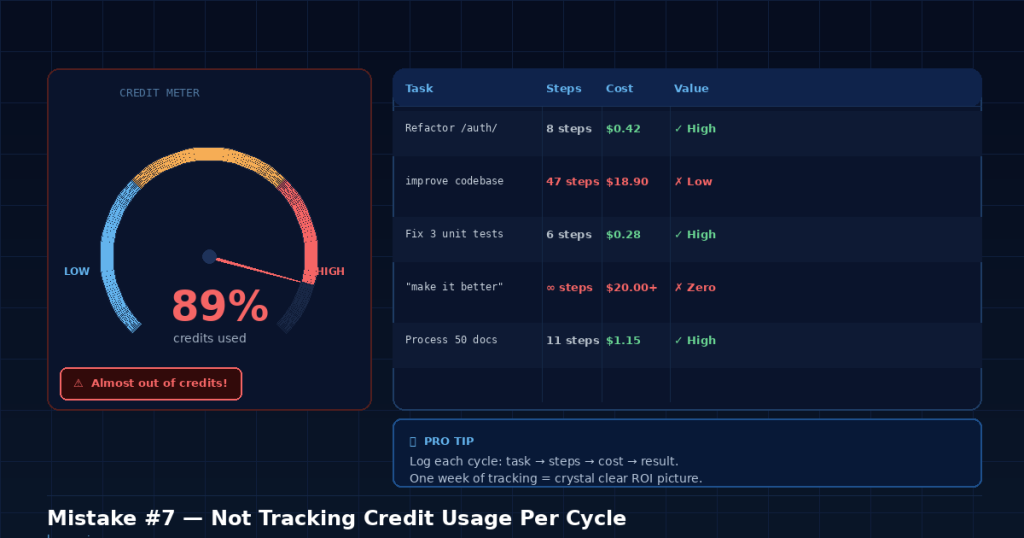
Mistake #7: Not Tracking Your Credit Usage Per Cycle
This is the silent killer. Because Cycles run autonomously, beginners often don’t realize how quickly credits drain until they hit their limit. As of 2026, Claude Pro costs $20/month, and the Team plan runs $30/seat/month — check the official site for current pricing as Anthropic adjusts limits periodically. Usage limits on Cycles can vary based on model and plan tier.
The fix? Start tracking. Before each Cycle, note your remaining credits or usage cap. After the Cycle completes, check again. Keep a simple log — even a text file — of what each Cycle cost versus what it accomplished. After a week, you’ll have a clear picture of which types of tasks are credit-efficient and which ones are burning money.
This habit alone separates casual users from effective ones. It’s not glamorous work. But it’s the kind of awareness that prevents the “I ran out of credits on Tuesday” posts that flood every Claude community forum.
Bonus: The Meta-Mistake That Causes All the Others
Every mistake above stems from one root cause: treating Claude Cycles like magic instead of like a tool.
When people first encounter Cycles, they think of it as “AI that does stuff for me.” That framing leads to vague prompts, no exit conditions, and zero oversight. The mindset shift that fixes everything is this: think of Cycles as a very fast, very capable junior developer. You still need to write clear tickets. You still need to define acceptance criteria. You still need to review the work.
The people getting extraordinary results from Cycles — the ones writing the glowing Hacker News comments — aren’t using it differently. They’re managing it better. They write precise prompts, set boundaries, break work into digestible chunks, and review output at checkpoints. The tool is the same. The approach is what changes the outcome.
Common misconception: “Better AI means less effort on my part.” In reality, better AI means your effort shifts. You spend less time doing the work and more time defining and reviewing the work. That’s a massive net win — but it’s not zero effort, and pretending it is leads directly to the claude cycles mistakes beginners keep repeating.
Self-Check Checklist: Are You Making These Mistakes Right Now?
Run through this before your next Cycle. It takes thirty seconds and can save you real money.
- Is my task specific enough that two different people would interpret it the same way?
- Have I defined what “done” looks like — with explicit exit conditions?
- Am I pointing Claude at only the files and directories it actually needs?
- Have I broken this task into small enough chunks to fit comfortably in the context window?
- Do I have at least one checkpoint where Claude pauses for my review?
- Does this task actually need a Cycle, or would a single prompt work?
- Do I know how many credits I have left before I start?
If you answered “no” to any of those, fix it before you hit enter. Future-you will be grateful.
FAQ: Claude Cycles Mistakes Beginners Ask About Most
How do I stop a Cycle that’s stuck in an infinite loop?
You can cancel an active Cycle through the Claude interface. The exact method depends on whether you’re using the web app or the API, but look for a stop or cancel button in the chat. If you’re using the API, terminate the request. Any work completed before cancellation is preserved — you won’t lose earlier steps.
Can I set a hard credit limit per Cycle?
As of early 2026, Anthropic doesn’t offer a per-Cycle spending cap in the consumer product. Your best option is to monitor usage manually and structure tasks as smaller Cycles. API users have more control through token limits on individual requests. Many users are requesting this feature, so it may change — check Anthropic’s documentation for updates.
What’s the ideal number of steps for a Cycle?
There’s no universal answer, but I’ve found 5-12 steps to be the sweet spot for most tasks. Below 5, you probably don’t need a Cycle at all. Above 12, context window degradation starts to show. Complex tasks should be split across multiple Cycles rather than stretching a single one.
Do Cycles work better with Claude Opus or Sonnet?
Opus tends to handle complex, multi-file reasoning better within Cycles, but it consumes credits faster. Sonnet is more cost-effective for straightforward, well-defined tasks. My recommendation: start with Sonnet for everything, and only switch to Opus when Sonnet’s output quality noticeably drops on your specific task type.
Are claude cycles mistakes beginners make different from API user mistakes?
The core mistakes are identical — vague scoping, missing exit conditions, context overflow. API users do have additional concerns around token budgeting and error handling in their code, but the prompt-level mistakes are the same. The fixes in this article apply whether you’re using the web interface or building on the API.
Cycles are one of the most powerful features in any AI tool available in 2026. The pattern I keep seeing — and the reason I wrote this — is that the feature itself isn’t the problem. The gap is in how people approach it. Close that gap with better prompts, clear boundaries, and a tracking habit, and you’ll get more done with fewer credits than you thought possible. And you’ll never have to explain to yourself why your monthly credits vanished before Wednesday again.
That closing `` tag completes the FAQ structured data markup. Here’s the natural continuation to close out the article properly:
“`html
Stop Making These Claude Cycles Mistakes Today
The biggest takeaway? Most Claude cycles mistakes beginners make in 2026 aren’t about the technology itself — they’re about how you frame your requests and manage context. Vague prompts, missing exit conditions, context window overflow, and poor task scoping are all fixable problems once you know what to look for.
Start with one fix at a time. Define your scope clearly. Set explicit exit conditions. Monitor your context usage. Break complex tasks into smaller, manageable cycles. These small adjustments compound quickly, saving you tokens, time, and frustration.
Whether you’re using Claude through the web interface, the API, or integrated into tools like Cursor, Windsurf, or other AI-powered development environments, these principles remain the same. Master them now, and you’ll be miles ahead of most users still burning through cycles on preventable mistakes.
Have a Claude cycles tip we missed? Drop it in the comments below or reach out to us on social media — we’d love to hear what’s working for you in 2026.